Everyone knows In the collection of overseas works of industrial design, rendering, generation, refinement of design drawings, final rendering, coloring, and other production and design are essential steps, Many students who apply for postgraduate study do not know how to operate step by step. If your entire design is for Party A, how can you present the steps and creative inspiration of your portfolio? Today, the natural light product design instructor will teach you how to do the industrial design overseas works collection?
Now the texture of industrial product design pictures is very important. A beautiful product design picture can give you minutes to plant grass successfully, and whether the product can be produced depends on the product renderings of the early designer, and whether the design concept and inspiration can be passed on to Party A's father!
Now, rendering is a skill that designers have to learn in industrial design, because it is necessary to use rendering in the process of industrial design of products. Rendering can make the product look fuller and richer, and the 3D effect is more obvious. In addition, the shadow and lighting effects make the product more ornamental!
What is the process from initial sketch to final rendering in the early stage of a product design? Let's take a look at the tutorial that Mr. Zhang prepared for you today!
Cited in this article Industrial designer Filip Chaeder This is a product design rendering tutorial that teaches you how to go step by step from the initial conception sketch stage to the final design scheme rendering. This article will also guide you How to present various ideas, how to draw a concept sketch, the time required, and how to continue the final demonstration of the selected concept through a step-by-step guide. Usually such a design process needs to be based on design research, but this tutorial will go directly to the conception stage.
The design product selected in this article is a smaller digital camera, but the steps in this tutorial are almost Applicable to any product International students can see this rapid process through the following figure.
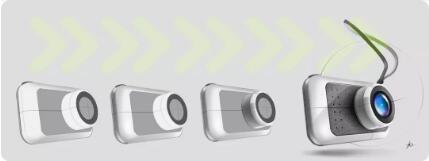
Generate
Suggested at the beginning Generally select front view, side view or top view (If permitted by the product). This is because it is a simple way to establish a rough prototype of the product and quickly show the creativity. At this time, it has not provided enough information for designers to determine whether the idea has potential. Recommended courses: "Shanghai Art Study Abroad Training" _Modeling/Rendering Costume Design "10 Day Course to Finish Sketchup/Rhino"
Of course, this initial idea stage may take several weeks, depending on the scope of the project, but now we only need one page of sketches. Once you have created some concepts that you are satisfied with, you can select some of them to enter the refinement and improvement phase of the scheme. We choose to explore and deepen three of the following plans.
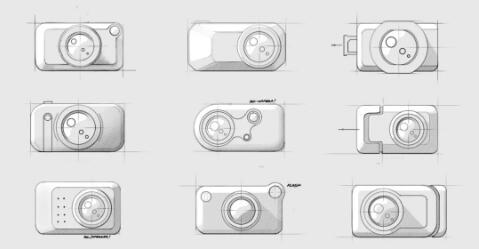
Refine
One of the most important stages of this process is to transform the selected concepts into 3D maps in the industrial design professional overseas work collection. At this stage Define and optimize concepts, demonstrate functions, and present them to customers in a way that can provide the information needed to select the final concept (Program evaluation). At this time, try to keep the details to a minimum, and Focus on the design part that makes the concept stand out No one wants to spend hours describing a concept that may not be further developed in the process - just spend enough time to make the drawing scheme concrete and understandable.
When presenting the creativity of industrial design works, we should give each concept its own space (unlike the following figure, which gathers everything together). It is usually best to have one page for each idea, or at least some more space.
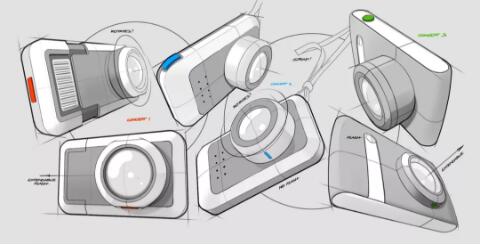
It is recommended that you see in the product design drawing above, The details of each concept can be color coded. This makes it easier for everyone to discuss these concepts with customers (or tutors/classmates). You can call them "green" rather than "concept three". It is easier to remember the color of the product design scheme than the number of the scheme.
Final Render
The blue concept (concept 2) is selected as the final scheme. There are still some details to be determined when entering the final stage, Material and color are the most important Unless otherwise stated in the initial design outline, it is necessary to explore the appearance of specific products. You can choose to view reference pictures of similar products, which is a good starting point. After a series of research, the design scheme of this product uses lighter colors, while the back and front are covered with darker fabrics.
First, choose a product perspective and make a simple product design sketch without worrying about whether to draw perfect lines and perspectives, Refer to the creativity of your product design portfolio to find the correct size and angle.
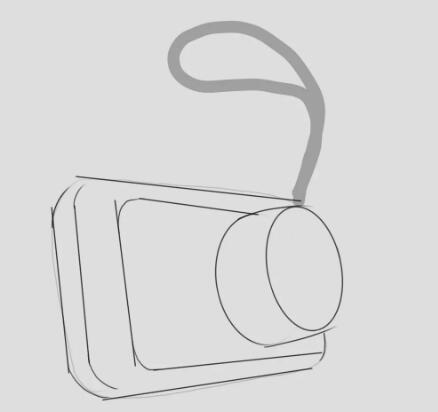
then Use three-point perspective to draw drawings on different layers, The drawn line will serve as an auxiliary construction line for the whole process. The center line will determine the origin position of the lens, and can also serve as a detailed guide for subsequent drawings. The blue line in the following figure is the center of the lens. Notice how it intersects the front and back of the construction line.
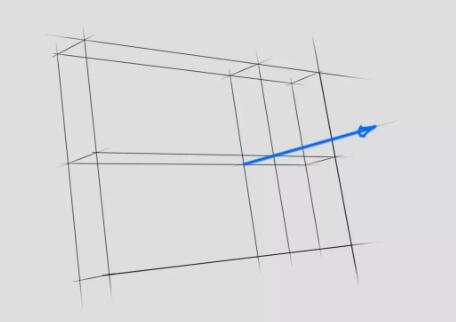
Note: For the preparation of industrial design overseas works collection, when using perspective tools, please note that the best way to focus on some non extreme perspectives is to place the end of the view outside the canvas. The small square in the middle of the figure below is the working area.
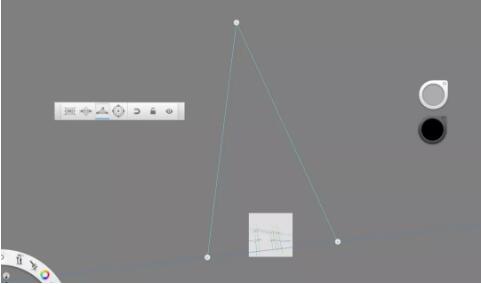
stay When building a camera lens, You can use the ellipse tool to align the centerline with the construction line highlighted in blue in the previous step. This can also make the angle of the ellipse fully align with another geometric shape, and then draw an ellipse with satisfactory size. If you want to know more about perspective, you can make a cube around the whole lens and use its edge line as the guide line of the ellipse.
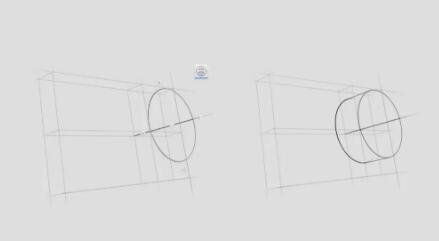
After the general auxiliary line construction is completed, you can Start to draw the design concept map. First, create the contour. At this time, you generally need to adjust the size to match the original concept, but you should try to be close to the guide line. For example, any outer edge line of the design should be tangent to the construction auxiliary line.

To make it easier to start shading, you need to always optimize all lines in the new layer and hide everything below them. (Step 4, refine.)
Shading
When starting shading Apply a background color to each material. This will make it easier to shade when you use the selection tool to highlight key parts. The three arrows inserted in the following figure are the positions where the light source is displayed.
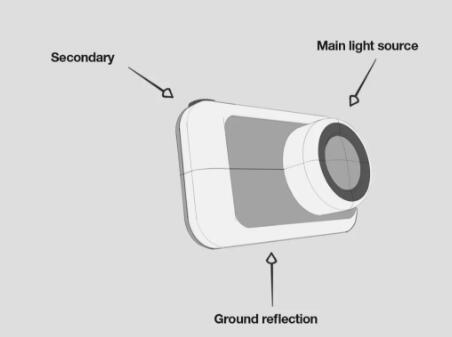
To simplify the operation, I will use SketchBook Pro's standard tools to color: airbrush, select tools and eraser (soft and hard). It is recommended to make one material at a time and then refine it. All the following steps are completed in different layers.
Painting and production of industrial design overseas works:
(1) , first use Wand Select the white area and use the Dark spray gun On top and bottom chamfers Add some lights and shadows 。
(2) , and then add a darker shadow , and use a white spray gun to add some Highlight 。
(3) . Using the same operation on the lens The darkest shadow Add on Same side 。
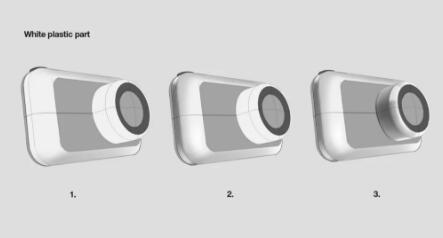
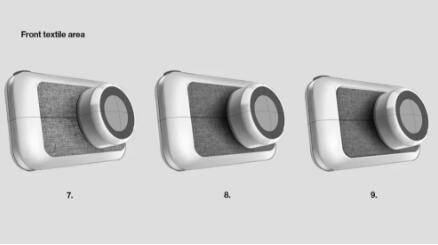
(4) , for Fabric part , first add a deep shadow to the lens.
(5) , and then insert the texture into the new layer Add Texture 。
(6) , and use the Twist tool to align it with Perspective Alignment 。
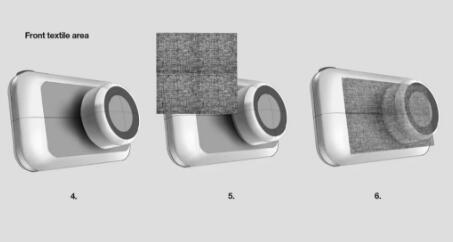
(7) , and then use an eraser Trim Texture 。
(8) , and put it move to Made in the first step shadow below.
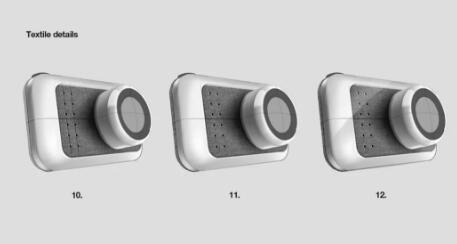
(9) . In order to make the industrial design collection design Outstanding material , can be Around split line Add highlights and shadows.
(10) . Then use two construction lines to assist in the fabric Place hole 。
(11) , and then place the same fabric texture on the back of the product.
(12) , and add one along the front of the second light source Highlights with sharp edges 。
(14) When making tapes for industrial design works, felt pens with thick tips are used here, and they are only made by hand. Dark color is used outside, and light color is used inside the belt (the thickness of the belt is basically the same)
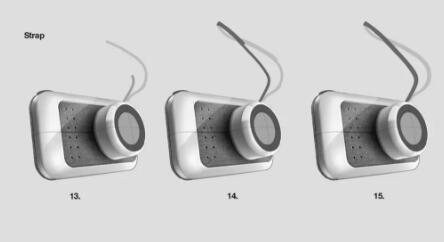
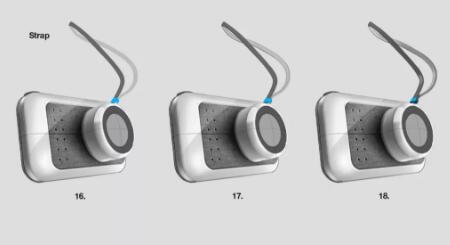
(16) . A plastic belt is added here Holder 。
(17) , and continue along the edge Make contour 。
(18) , and then by placing some shadows and highlights Whole tape 。
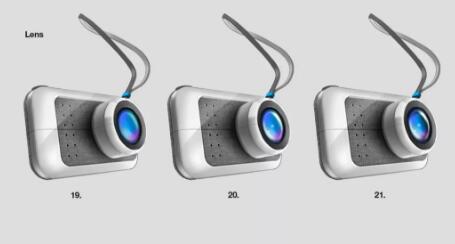
(19) . Start with the lens and use the ellipse tool.
(20) , placed some bright colors and internal shadows. Then use the spray gun to place the highlight.
(21) More shadows.
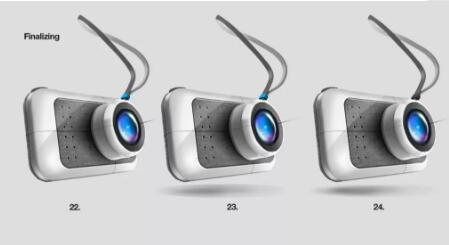
(22) In order to complete the design of the collection, you can start to delete some contours around the edges, mainly the position where the light shines on the product. also Improved lines and shadows 。
(23) Then use the ellipse tool and spray gun to Make Shadow The darkest part in the shadow should be the area closest to the main body of the product.
(24). Then use a soft eraser to erase the edges Improve Shadows , and finally decided to change the color of the belt holder to black.
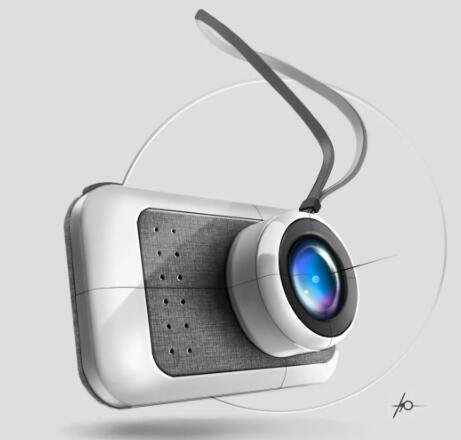
The final collection of industrial design works is exquisite and highly presented.
If the operation steps of these industrial design overseas works are not clear enough, you can see the complete drawing process in the following video clip: youtube com/watch? v=Tzkfzzf9tTU
Supervisor of industrial product design portfolio: Mr. Zhang
Kingston University - Contemporary Art Curatorial Design
Good at courses
Industrial design, interaction design, art management
Mr. Zhang graduated from Cardiff City University with a bachelor's degree and a master's degree Kingston University Contemporary art curatorial design major, once participated in the Intensive Program sponsored by the Howest Industrial Design Center on behalf of the school as team leader; When working in Sto Werkstatt, England, as an assistant, I worked with famous architects Francessco Draisci, HASSELL studio, J ü rgen Hermann Mayer and others on installation projects. Mr. Zhang specializes in Speculative Design and Interactive Product Design, has in-depth research on the entire art and design industry, and is very good at guiding and training students in design research and divergent thinking, helping students to maximize their professional ability.
More about the operation process of design portfolio:
The training instructor of architectural design works set took part in the evaluation of the advantages and disadvantages of five "rendering" software
This article belongs to the original article of Natural Light International Art Education Team. Without permission, it cannot be reproduced commercially in any form. If it is found, it must be investigated for legal responsibility.